
Tech Digital Wellbeing Product Review
Affiliate disclosure: This post contains affiliate links. If you buy through them, we may earn a commission at no extra cost to you. We only feature products we believe are relevant to the topic, and our opinions are our own.
Most of us have tried to cut our screen time at least once. We set an app limit, felt good about it for a day, and then tapped “Ignore Limit” the first time we were bored or stressed. If that sounds familiar, the problem is probably not your willpower. It is that the tool meant to stop you is sitting inside the same device that is designed to hold your attention. In this review, we look at a different approach, a small physical device that locks your phone’s distracting apps, and ask whether it really works.
Tap to lock Physical device, not just an app | No battery Nothing to charge | 30-day returns Money-back guarantee |
Why screen time limits so often fail
Built-in tools like Apple’s Screen Time and Android’s Digital Wellbeing are useful for awareness. They show you how many hours you spend on your phone and let you set limits. The weakness is what happens when the limit is reached. In most cases, one tap on “Ignore Limit” or “Remind Me Later” and you are back in the app.
The other common workarounds have the same flaw. Deleting an app is easy to undo by reinstalling it. Switching your screen to grayscale is easy to switch back. Behavior researchers often point out that habits are shaped by friction, meaning how easy or hard an action is. Social media, short video, and news feeds are designed to be nearly frictionless, so a limit that you can dismiss in half a second rarely holds up against a craving to scroll.
That is the gap physical phone locks try to fill. Instead of asking you to resist a temptation that is always one tap away, they put a deliberate step between you and the apps you want to avoid.
What is Brick and how does it work?
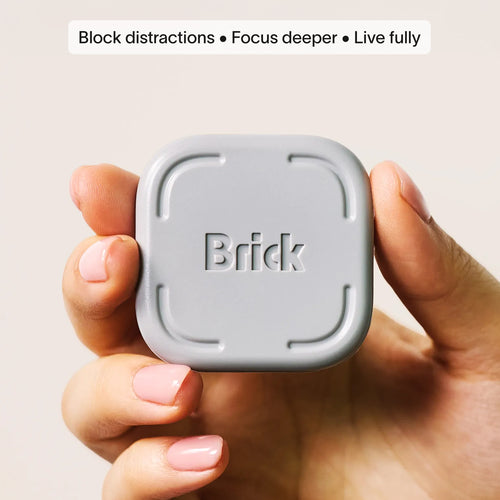
Brick is a small physical device that works together with a companion app on your phone. The idea is simple: you choose which apps to block in the Brick app, then tap your phone against the device to start a session. While a session is active, those apps stay blocked. To end it, you tap the device again. The company’s pitch is that the “key” that turns distractions back on is not on your phone, so it cannot be dismissed with a quick tap.
There are three steps to using it:
1. Choose your apps. In the Brick app, select the apps you want to block and set up custom modes for different parts of your day.
2. Tap Brick. Hold your phone against the device to activate a session.
3. Get on with your day. Your phone remains usable for the essentials while the blocked apps stay out of reach until you tap Brick again.
A few features are worth knowing about. Strict Mode is designed to stop you from deleting the Brick app or changing settings to get around a session. If you lose the device, the app includes five Emergency Unbricks that unblock everything. One Brick can be used with several phones, and you can also use several Bricks with one phone, for example one at home, one at work, and one in the car. Brick has no battery, so there is nothing to charge.
According to the company, Brick works with Android 12 or later and iPhones running iOS 18 or later, so check your phone’s software version before buying.
Brick modes in real life
The part that makes Brick more than a simple on and off switch is custom modes. The app lets you build routines around the way you actually live, and the company showcases examples such as Deep Work, Study, Training, Creative Time, Family Time, Social Time, and Sleep.
Each mode blocks a different set of apps. A work mode might block social media and news but leave email and messaging available. A sleep mode can block a wider list so that late-night scrolling stops before it starts. This flexibility matters because a lock that blocks everything is not realistic for most people, who still need their phone for calls, maps, banking, or work.
Brick vs built-in screen time tools
| Factor | Built-in tools (Screen Time, Digital Wellbeing) | Brick |
|---|---|---|
| Cost | Free | One-time purchase |
| Easy to bypass? | Often yes, with one tap | Requires tapping the physical device |
| Custom modes | Basic scheduling and limits | Custom modes, schedules, analytics |
| Setup | Built into your phone | Device plus app |
| Best for | Awareness and light limits | People who keep overriding their own limits |
It is worth trying the free tools first if you have not already. If you have a long history of tapping past your own limits, a physical barrier may be the missing ingredient.
The pros
Real friction. The main advantage is that blocked apps cannot be reopened with a casual tap. That small barrier is often enough to break an automatic scrolling habit.
Flexible modes. You can match the blocking to your day instead of using a single all-or-nothing setting.
Simple and low-maintenance. There is no battery, and one device can work with several phones, which suits households and families.
Low-risk trial. The 30-day money-back guarantee means you can test it without being locked in. It is also HSA and FSA eligible, according to the company.
Press coverage. Brick has been reviewed by outlets including The Wall Street Journal, The Washington Post, and Wirecutter, which suggests the concept has been tested beyond the company’s own marketing.
The cons and things to consider
It costs money. Built-in tools are free, so you are paying for the physical barrier. Whether that is worth it depends on how much you struggle with ignoring your own limits.
It only blocks what you tell it to. If you swap one scrolling habit for another, such as a different app, a browser, or a tablet, the device will not stop you. You still need to be honest about which apps are your real problem.
It depends on you. Brick makes avoiding distractions easier, but it will not fix the reasons you reach for your phone, such as stress or boredom. It works best as a tool that supports a habit change, not a replacement for one.
Compatibility requirements. You need a reasonably recent phone, Android 12 or later or iOS 18 or later.
Think about where you keep it. A device you leave at home keeps you locked out of distractions while you are away, which is the point, but it also means planning ahead for the days you do need certain apps.
What does the company’s survey say?
Brick reports results from a survey of more than 3,500 users: over 95% said they feel less distracted, over 93% said they are more focused, and over 99% said they reduced their screen time. These figures are impressive, but they come from the company’s own survey and rely on self-reported answers from people who chose to buy and keep the product. They are a useful indicator, not independent proof, and your own results may differ.
Who is Brick best for, and who can skip it?
Brick is a good fit if you keep overriding built-in limits, if you want protected time for deep work, studying, or sleep, or if you want to create screen boundaries for your household. Students and remote workers who struggle with phone interruptions are common examples.
You may not need it if free tools already keep you on track, if your phone use is mostly essential for work, or if your screen time issue is mainly on a laptop or tablet instead of your phone.
Tips to get the most out of a phone lock
Start with one mode. A single focus session or a bedtime mode is easier to stick with than rebuilding your entire day at once.
Keep Brick out of reach for sleep. Placing it across the room or in another room adds one more small step between you and late-night scrolling.
Block your real triggers. Use your existing screen time report to find the two or three apps that eat the most time, and start there.
Tell the people around you. Family, partners, and coworkers are more understanding about slow replies when they know you are in a focus session.
Frequently asked questions
How is Brick different from Screen Time or Digital Wellbeing?
Built-in limits can often be skipped with a tap. Brick requires you to tap a physical device to start and end a session, which adds friction and keeps the temptation out of easy reach.
Can I just delete the app or find a workaround?
The company says its Strict Mode is designed to prevent deleting the app or changing settings to end a session early.
Can I use one Brick with multiple phones?
Yes. One Brick can work with as many phones as you like, and it works across iPhone and Android. You can also use multiple Bricks with one phone, such as one at home and one at work.
What if I lose my Brick?
The app includes five Emergency Unbricks that automatically unblock all apps if you cannot access your device.
Which phones does it work with?
According to the company, Android phones running version 12.0 or later and iPhones running iOS 18.0 or later are supported.
Is Brick worth it?
If free limits have not worked for you and you want a stronger barrier, many people find the physical step useful. With a 30-day money-back guarantee, you can test it with limited risk. Check the official page for the current price and offer.
Final thoughts
Screen time limits fail because they are too easy to dismiss, not because people are weak. A physical phone lock adds the one thing most digital tools lack: a small, deliberate step that interrupts the autopilot. It will not solve every distraction, and it does ask you to be honest about your habits, but for people who keep tapping past their own limits, it is one of the more practical ideas in digital wellbeing.
If you want to try it, the guarantee keeps the risk low. Start with one mode, block your biggest time-wasting apps, and give it a couple of weeks before deciding.
Disclaimer: This blog is for general informational purposes only and is not medical or mental health advice. If your phone use is affecting your sleep, relationships, or wellbeing, consider speaking with a qualified professional. This post contains affiliate links; we may earn a commission on qualifying purchases at no additional cost to you. Product details, compatibility, and prices may change, so always verify on the official website.