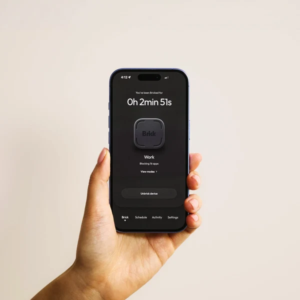



Brick vs Unpluq: Brick is the stricter, pay-once option. Unpluq is the cheaper way to start and more flexible, but it needs a subscription. Brick costs $59 one time. You tap your phone to a magnetic puck to block apps, and they stay blocked until you tap the puck again. Unpluq’s Tag costs $26.50 on its own, and the app’s Premium subscription is required to use it ($29 for 3 months, or $81 for 12 months with a Tag included). Unpluq also lets you unlock apps with on-screen “barriers,” such as shaking your phone, instead of the Tag.
We haven’t tested either device ourselves. This comparison is based on each brand’s product pages, FAQs and help-center articles, plus published hands-on reviews, all checked on October 21, 2026. Features and prices change, so check before you buy.
Quick verdict
- Pick Brick if you want a hard stop: apps stay blocked until you’re physically next to the puck. You get no recurring fee, up to 10 custom modes, and Strict Mode to stop you deleting the app mid-session.
- Pick Unpluq if you want a lower first payment, a free tier to try (two apps, one schedule), or a gentler setup where you can choose easier barriers like shaking your phone or tapping buttons.
- Cost over time: Brick stays at $59. Unpluq’s 12-month plan with a Tag costs $81, and a second year without a new Tag costs $76 at current prices.
Brick vs Unpluq at a glance
| Feature | Brick | Unpluq |
|---|---|---|
| Hardware | Magnetic NFC puck, no battery or charging | Keychain-sized NFC Tag with mini carabiner |
| Price | $59 one time; app is subscription-free | Tag $26.50; Premium 3 months $29, 6 months $46 (with Tag), 12 months $81 (with Tag) or $76 (without) |
| Free version | App works with the Brick (no separate paid tier) | Free app blocks 2 apps on 1 schedule; the Tag requires Premium |
| How you unlock | Tap the phone to the Brick again | Scan the Tag, or use another barrier you choose (shake, tap 7 buttons, QR code, scroll, random, walking on Android) |
| Modes and schedules | Up to 10 custom modes; scheduling; remote activation | Unlimited apps and schedules on Premium |
| Emergency access | 5 Emergency Unbricks, resettable on request | Emergency Mode: 5 minutes, once a day (can be disabled); “lost Tag” switch, 5 times per account |
| Phone support | iOS 17.0+ and Android 12.0+ | iOS 16+ and Android |
| Guarantee | 30-day, no-questions-asked | 30-day money-back; free returns within 30 days |
How each one works (NFC tap vs “barriers”)
Brick: you pick the apps (or websites) to block, or flip it and pick only the apps you want to keep. Then you tap your phone on the Brick to start a session. Brick says the puck “has to be physically present to re-enable your apps,” so if you leave it in another room, those apps stay locked until you walk back. You can also start a session remotely with a long press in the app, but ending it still requires the physical Brick. The puck has a magnet and an anti-slip silicone base, and it needs no batteries, charging or Wi-Fi.
Unpluq: you choose apps to block and set schedules. During those times, opening a blocked app means passing a “distraction barrier.” The Tag is one barrier. The others include shaking your phone for 5 seconds, tapping 7 buttons, scanning a QR code, scrolling, a random barrier and walking (Android only). Unpluq says the Tag unblocks apps “for minutes at a time,” so it’s built around a pause before you open an app, not a session that stays locked.
That’s the core difference. Brick is a lock you have to walk to. Unpluq adds friction you can tune, from mild to strict.
Price over 1 and 2 years (one-time vs subscription)
| Period | Brick | Unpluq (Premium + Tag) |
|---|---|---|
| Year 1 | $59 | $81 (12 months with Tag) |
| Year 2 total | $59 (no change) | $157 ($81 + $76 for 12 months without Tag) |
| Cheapest way to start | $59 | $29 (3 months with Tag) |
Unpluq figures use the prices listed on its store on October 21, 2026, and assume renewal prices stay the same. Brick says the puck works with as many phones as you like, so one $59 Brick can cover a household. Unpluq sells a separate Family plan ($79.95 Lite or $99.95 Full, with a Tag and a yearly Family subscription) for parents managing a child’s phone. Brick lists free shipping on orders of $75 or more and says it’s HSA/FSA eligible.
Setup on iPhone vs Android
Both use your phone’s NFC reader, so check that your phone has NFC (most modern phones do).
- Brick: requires iOS 17.0 or later, or Android 12.0 or later. On iPhone you can block any app except Phone, per Apple’s rules. On Android you can block any app except Phone and your launcher. Brick says block lists are stored on your phone and it can’t see them.
- Unpluq: works on iPhone (iOS 16+) and Android. Unpluq’s troubleshooting page says some Android phones’ battery optimization settings can stop it from blocking apps until you allow it to run in the background. On iPhone, the app-picker screen comes from Apple, and Unpluq says it can sometimes crash or show blank categories.
How hard is it to cheat? (emergency unbricks vs emergency mode)
Brick gives you five Emergency Unbricks that unblock all apps without the puck. They’re meant for real emergencies or a lost Brick. Brick’s help center says that once you’ve used all five, you can request a reset in the app (after a short survey) within one business day. Brick’s Strict Mode locks settings and stops you from uninstalling the app to end a session.
Unpluq has Emergency Mode, which gives full access for 5 minutes once a day and lets you change your barrier. You can turn Emergency Mode off entirely. If you lose your Tag, you can mark it lost to switch your schedules to a non-Tag barrier, but only 5 times over the life of your account.
In practice, Brick is harder to get around by default. Unpluq can be nearly as strict if you choose the Tag barrier and disable Emergency Mode, but it lets you pick easier options too.
Website and Safari blocking limits
- Brick: Brick’s FAQ says on iPhone you can block “selected Safari sites from Apple’s approved list.” A February 2026 help article says websites you select are blocked “on Safari, Chrome, and other browsers,” but an older Brick troubleshooting page says Brick can block browser apps entirely but can’t block specific links in non-Safari browsers. Because Brick’s own pages disagree, test the sites you care about during the 30-day guarantee window.
- Unpluq: on iOS, you can block websites in Safari only, and only sites you’ve already visited in Safari, because of how Apple’s tools work. Unpluq says iOS doesn’t support blocking websites in other browsers such as Chrome. On Android, website blocking isn’t available yet.
Neither one blocks your laptop or desktop. They work only on the phone where the app is installed.
What published tests found
We haven’t measured our own screen time, so here’s what other outlets reported after trying Brick. In CNN Underscored’s review, the writer averaged 6 hours 56 minutes of daily screen time in a normal week and hit a low weekly average of 3 hours 44 minutes in his first full week with Brick. Consumer Reports’ reviewer said Brick “did help,” with some days under 3 hours and others still above 5. Both said the device works best alongside a real effort to change habits. Unpluq says its average customer saves about 1 hour 20 minutes a day, which is the company’s own figure.
Who should pick which
Brick is the better fit if you…
- keep ignoring screen-time limits and want a lock you can’t skip
- don’t want another subscription
- want to share one device across several phones in your home
Unpluq is the better fit if you…
- want to try app blocking for free first
- prefer a quick pause before opening apps over a full lockout
- like carrying the key on your keychain, or want a family plan for a child’s phone
Want the full picture on Brick? Read our complete Brick review, which covers modes, setup and emergency unbricks.
Get Brick ($59, no subscription) · View Unpluq on unpluq.com
Frequently asked questions
Is Brick or Unpluq better?
Brick is better if you want a strict lock and no subscription: $59 once, and apps stay blocked until you tap the puck again. Unpluq is better if you want a free tier, a lower starting price ($29 for 3 months with a Tag) and adjustable barriers. Over two years, Unpluq costs more at current prices.
Does Unpluq require a subscription?
To use the Tag, yes. Unpluq says Premium is required for the Tag, with plans from $29 for 3 months to $81 for 12 months with a Tag. The free app blocks two apps on one schedule using non-Tag barriers. Brick’s app has no subscription.
What happens if I lose my Brick or Unpluq Tag?
Brick gives you five Emergency Unbricks, and you can request a reset once they’re used up. Unpluq lets you mark the Tag as lost, which switches you to a non-Tag barrier, up to five times per account, and you can buy a replacement Tag for $26.50.
Can Brick or Unpluq block websites?
Partly. Brick can block Safari and selected sites, and its help center says selected websites are blocked in other browsers too, though another Brick page says otherwise. Unpluq blocks only previously visited sites in Safari on iPhone and doesn’t block websites on Android yet.
Do Brick and Unpluq work on Android?
Yes. Brick supports Android 12.0 or later and iOS 17.0 or later. Unpluq works on Android and iOS 16+, though Unpluq notes that some Android phones’ battery settings need changing so it can block apps in the background.
Sources
All pages accessed October 21, 2026 (PKT).
- Brick, product page (how it works, features, guarantee, compatibility): getbrick.com
- Brick, FAQs: getbrick.com
- Brick, “Need help blocking?” (browser blocking): getbrick.com
- Brick Support, “What are Emergency UnBricks and how can I replenish them?”: support.getbrick.com
- Brick Support, “Website Blocking” (edited Feb. 26, 2026): support.getbrick.com
- Unpluq, homepage and Premium Subscription listing (prices, what’s included, compatibility): unpluq.com
- Unpluq, FAQ (barriers, free version, lost Tag, Emergency Mode, website blocking): unpluq.com
- Unpluq, Troubleshooting: unpluq.com
- CNN Underscored, “The Brick: Tested review”: cnn.com
- Consumer Reports, “Can Brick Solve My Screen Time Problem?”: consumerreports.org
Image credits: Featured image based on a photo by Valentin Ilas (Pexels); in-article photo by Hanna Pad (Pexels). Both used under the Pexels License. Generic photos, not Brick or Unpluq products.
Disclosure: SaveMoreBrands may earn a commission if you buy through some links on this page, at no extra cost to you. Unpluq links are not affiliate links. This doesn’t change how we compare products.