


Review – Updated 2026 – Screen time and focus
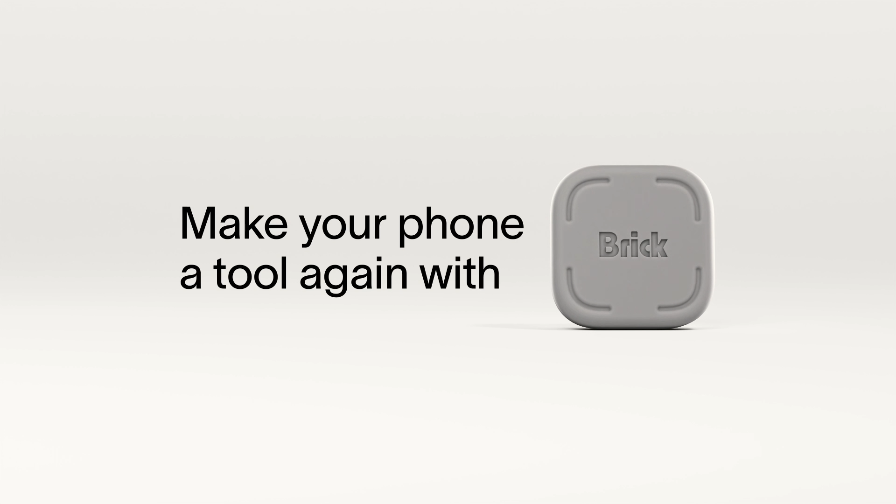
If you have ever set a screen time limit, watched the notification pop up, and tapped Ignore Limit without thinking twice, you already understand the problem. Brick was built to fix exactly that.
Last reviewed: October 25, 2026
55K+ 5-star reviews (company-reported) | 99% Reduce screen time (company survey) | $59 One-time, no subscription |
Figures as reported by Brick (company survey and review data); not independently verified.
What is Brick and how does it work?
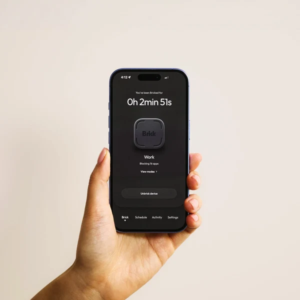
Brick is a small physical device that blocks distracting apps on your phone when you tap it. Choose which apps to block, set up custom modes in the companion app, then tap your phone against the Brick device to start a session. Your selected apps are blocked until you physically tap the device again.
That physical step is the entire point. The override is no longer one tap away on your screen. It is sitting on your desk, your nightstand, or your kitchen counter, requiring a deliberate action to get back to your distractions.
Other solutions ✗ Screen Time, easy to ignore ✗ Deleting apps, easy to reinstall ✗ Grayscale mode, easy to undo | Brick ✓ Physical key, not on your phone ✓ Strict Mode closes loopholes ✓ No battery, no subscription |
 | The Brick Device $59.00 Works with iPhone and Android. No battery. No subscription. One tap blocks distracting apps. Physical separation from your phone’s override button. |
Brick price and what’s included (checked October 24, 2026)
Prices checked October 24, 2026. We rechecked Brick’s official product page and FAQ today. Here is what a US buyer gets:
- Price: $59.00 for one Brick. Buying 2 or more takes 10% off and adds free shipping (two Bricks drop from $118 to $106.20). Brick also lists free shipping on orders over $75.
- Subscription: none. Brick’s product page says “No recurring fees. Lifetime app access included” on iOS and Android.
- Hardware: a high-grade magnet and anti-slip silicone base, with no charging, no Wi-Fi and no batteries.
- App features: up to 10 custom modes. On iPhone you can block any app except Phone (per Apple policy), plus selected Safari sites from Apple’s approved list. On Android you can block any app except Phone and Launcher.
- Safety net: five Emergency Unbricks that unblock all apps, and you can email Brick to request more. Strict Mode is designed to stop you from deleting the app or changing settings to end a session early.
- Remote start: hold the virtual Brick in the app for 5 seconds to start a session from anywhere. You still need the physical Brick to end it.
- Guarantee and payment: a 30-day money-back guarantee, and HSA/FSA payment at checkout through Brick’s partner Truemed.
- Compatibility: Brick requires iOS 18 or later on iPhone (per its App Store listing) and Android 12.0 or later.
- Optional extras: Brick Case ($39), Brick Mount ($15), and the new Brick Night ($129), which uses Bluetooth to block your chosen apps automatically when you get into bed. A Brick + Brick Night bundle is listed at $169 (regular $188).
A note on the numbers. The “55,000+ 5-star reviews” count and the 95% / 93% / 99% figures (less distracted, more focused, reduced screen time) on Brick’s website are vendor data. Brick says the percentages are “based on a survey of 3,500+ users.” We have not independently verified them. The 55K+ and 99% figures in the stats box at the top of this page come from the same company source.
Still not sure a physical lock is the right approach? Our phone lock and screen time comparison puts free built-in tools, app blockers, timed lockboxes and lockable pouches side by side, with a printable phone-free evening checklist.
Weighing Brick against a keychain-tag blocker? Our Brick vs Unpluq comparison covers how each one blocks apps, what each costs over one and two years, and how hard each is to cheat.
Check the current Brick price on the official site
Custom modes: how people are actually using it
Brick lets you create different blocking profiles for different parts of your day. The same device serves multiple purposes depending on when you reach for it.
Deep work mode blocks email, social media, and messaging during focused hours. Family time mode keeps distracting apps quiet during evenings so being home actually means being present. Sleep mode blocks everything that keeps your brain wired before bed. Students use study mode to stay in deep focus without feeds competing for attention. If you are getting ready for a new term, see our picks of laptops for college students.
What real users are saying
“It’s not often you can say a product actually changes your life, but the Brick has done just that.” Richard, Clinical Research Nurse
“Since we bought the Brick, we’ve spent so much more time as a family together.” Mannon, Dad
“Brick has changed the way I study. I’m currently in my junior year and still use it every day.” Brennan, Nursing Student
Covered by:
NYT Wirecutter
Wall Street Journal
Washington Post
Vogue
CNN
Who is Brick for?
People who have tried and failed with software solutions. Students who need sustained focus without relying on willpower. Parents who want to be present at home. People who want better sleep by stopping evening screen use at the source. Brick is also now HSA and FSA eligible, meaning it can be purchased with pre-tax dollars.
Is it worth $59?
At $59 one time with no subscription, no battery, and a 30-day money-back guarantee, the question is whether continuing to lose hours per day to distraction is worth more than that. For most people asking that question seriously, the math is clear. One Brick also works with multiple phones, so households where more than one person benefits can share the cost.
Frequently asked questions
How is Brick different from just putting my phone in another room?
Brick blocks specific apps rather than your entire phone. Calls, maps, and apps you actually need during a session still work. Putting your phone away removes everything. Brick removes the distracting parts while leaving the useful parts available.
What if I have a genuine emergency during a session?
The app includes five Emergency Unbricks that unlock all apps immediately. This covers real situations where being separated from your phone is a genuine problem rather than just uncomfortable.
Does Brick need to be charged?
No. The device uses NFC technology and requires no battery or charging. It is always ready when you are.
Does it work with both iPhone and Android?
Yes. Brick requires iOS 18 or later on iPhone (per its App Store listing) and Android 12.0 or later.
Is there a subscription for Brick?
No. Brick’s product page says there are no recurring fees and lifetime app access is included on iOS and Android. The device is a one-time purchase ($59 when we checked on October 24, 2026).
What happens if I lose my Brick?
You can use one of the five Emergency Unbricks to unblock all of your apps. According to Brick’s FAQ, you can request more by emailing hello@getbrick.com.
Can you get around Brick?
Brick is built to add friction, not to make your phone impossible to use. Strict Mode is designed to block the obvious loopholes, like deleting the app or changing settings to end a session early. The limited Emergency Unbricks are the official way out when you really need your apps back.
Can I start a session if my Brick is somewhere else?
Yes. Brick’s FAQ says you can hold down the virtual Brick on the app’s home screen for 5 seconds to start a session from anywhere. You still need the physical device to end it.
Is there anything Brick can’t block?
On iPhone, the Phone app can’t be blocked (per Apple policy), and website blocking is limited to selected Safari sites from Apple’s approved list. On Android, Phone and Launcher can’t be blocked.
Final thoughts
Screen time solutions that rely entirely on willpower have a consistent track record of not working for the people who need them most. Brick solves a behavioral problem with a physical solution, which is the reason it works differently from everything else in this space. The override button that defeats every software-based solution does not exist when the key to your apps is a separate physical object across the room.
Sources
- Brick, “The Brick” product page (price, bundle discount, what’s included, iOS 17.0+ note), accessed October 24, 2026: getbrick.com/products/grey-brick
- Brick, FAQs (compatibility iOS 18.0+ / Android 12.0+, blockable apps, Emergency Unbricks, Strict Mode, remote start, HSA/FSA, shipping), accessed October 24, 2026: getbrick.com/pages/faq
- Brick, homepage (Brick Night price, “55,000+ 5-star reviews,” survey of 3,500+ users; vendor data), accessed October 24, 2026: getbrick.com
- Brick, “Shipping Policy,” accessed October 25, 2026: getbrick.com
- Product-box photos: Hanna Pad and Greta Hoffman via Pexels (Pexels License). Images show a generic smartphone, not the Brick device.
 | Ready to take back your time? $59.00 30-day money-back guarantee. 10% off and free shipping on 2 or more Bricks, plus free shipping on orders over $75 (per Brick’s site, October 25, 2026). HSA and FSA eligible. Works with iPhone and Android. |
Affiliate disclosure: This blog contains affiliate links. If you make a purchase through our link, we may earn a commission at no extra cost to you. We only recommend products we genuinely believe provide real value.